

How to connect different accounts from same social network?
📌 Connecting Multiple Social Accounts
Many users manage multiple accounts on the same social network—either personal accounts or client accounts. ContentStudio allows you to connect and manage different accounts for the same platform.
Facebook allows you to easily switch between multiple accounts. Follow these steps:
Locate the Facebook account switch icon on the platform.
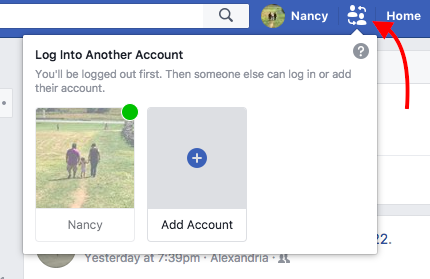
Click the icon and select the account you would like to use. Clicking on the profile image will log you into that account.
After switching accounts, connect your desired Facebook account through the ContentStudio platform.
Twitter, LinkedIn, and Pinterest
These platforms do not support multiple account switching within the same browser session. To connect additional accounts:
Log out of your current account on the platform.
Log in with the second account you want to connect.
Go to ContentStudio → Settings → Social Accounts to connect the new account.
Was this article helpful?