

Email PDF Reports
Email PDF sends an analytics report as a PDF straight to your clients, managers or teammates. Choose the report type, accounts and sections, add up to 25 email addresses, and ContentStudio emails the report with the PDF attached. You will find Email PDF in the Export menu on your analytics pages, such as the Overview, the platform pages, Meta Ads and Campaign & Label.
How to Access Email PDF
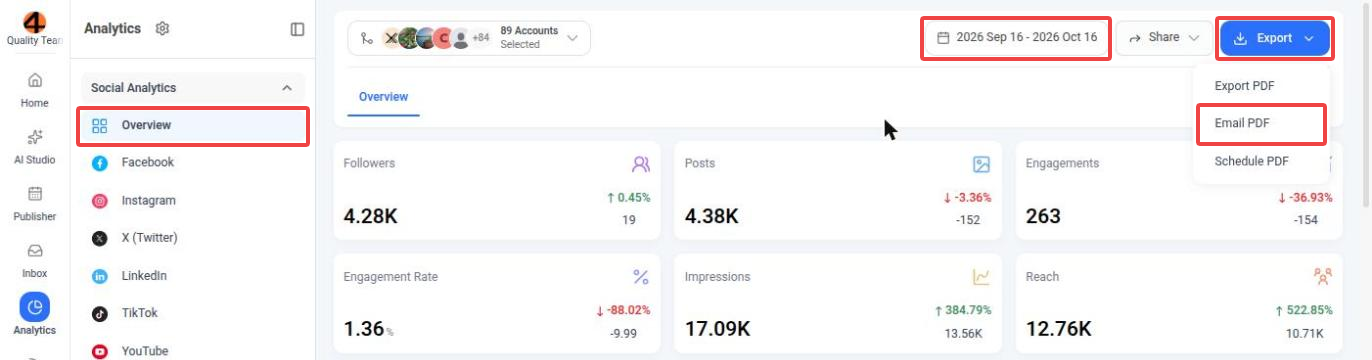
Sending a Report by Email
The Send PDF as Email window opens with the accounts from the page already selected. Fill in the details and send the report:
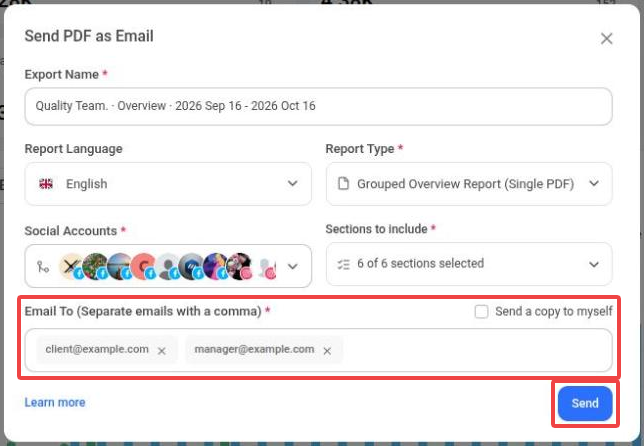
ContentStudio generates the report and emails it to everyone on the list with the PDF attached.
Report Options
Reports can be generated in English, French, German, Italian, Spanish, Polish, Swedish, Czech, Chinese and Greek.
Choose how your PDF is put together:
- Grouped overview report (single PDF): combined insights for all selected accounts in one PDF with an overview layout.
- Individual overview reports (single PDF): an overview report for each account, one after the other in a single PDF.
- Individual overview reports (separate PDFs): an overview report for each account, each in its own PDF.
- Detailed insights report (single PDF): detailed insights for each account, one after the other in a single PDF.
- Detailed insights reports (separate PDFs): detailed insights for each account, each in its own PDF.
The overview report types are available for Overview reports. Platform and Meta Ads reports use the two detailed insights types.
Pick the sections that appear in your report. Use Select all to include everything, or search for a section.
- Overview reports: Overview cards, Engagement vs publishing behaviour, Platforms engagement breakdown, Performance comparison, Top posts and Account insights.
- Platform reports list the sections of that platform's analytics, such as Audience Growth, Top Posts or AI Insights.
- Detailed insights reports sent from the Overview always include every section. To choose specific sections, open that platform's analytics page and send the report from there.
Good to Know
- You can send a report to up to 25 email addresses at a time.
- Recipients get the report as a PDF attachment, so they don't need a ContentStudio account to read it.
- The company logo and name you add under Analytics → Manage Reports → Reports Settings are applied to your reports.
- Want to keep a copy of the PDF? Use Export PDF to download it. To email the report automatically every week or month, use Schedule PDF.
FAQs
How many email addresses can I add?
Up to 25 per report. Separate the addresses with commas.
Can I send the report to myself?
Yes. Select Send a copy to myself, or add your own address under Email To.
Do recipients need a ContentStudio account?
No. The report arrives as a PDF attachment that anyone can open.
Can I include multiple accounts in one PDF?
Yes. Select the accounts under Social Accounts and choose a single-PDF report type, such as Grouped overview report (single PDF), Individual overview reports (single PDF) or Detailed insights report (single PDF).
Which date range does the emailed report cover?
The date range selected at the top of the analytics page when you click Email PDF.
Can I email a report automatically every week or month?
Yes. Use Schedule PDF from the same Export menu, or create a schedule from Analytics → Manage Reports → Schedule Reports.
Which languages are available?
English, French, German, Italian, Spanish, Polish, Swedish, Czech, Chinese and Greek.
Was this article helpful?