

Device selection for mobile notifications
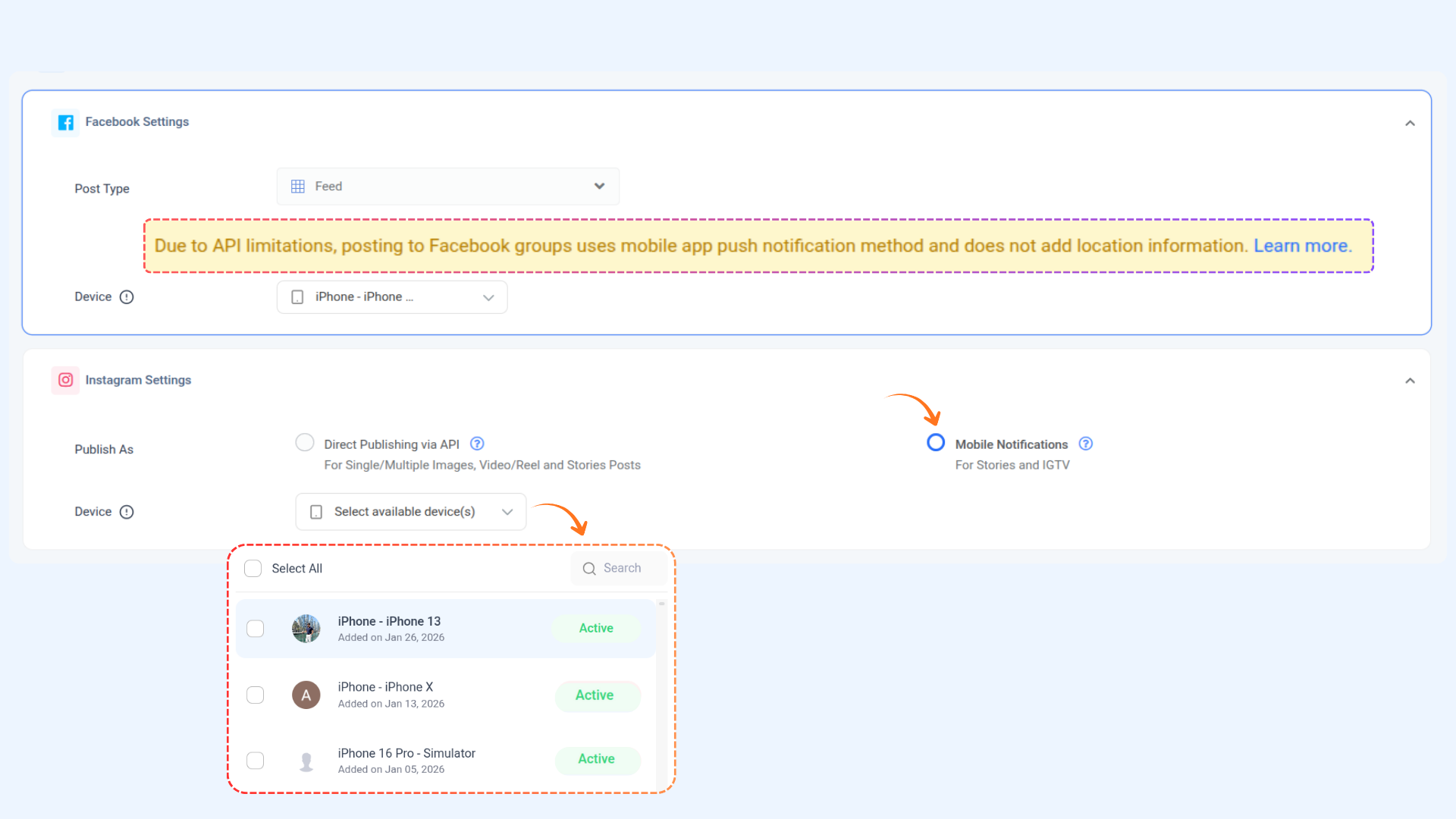
When scheduling a post via Mobile Notification for Instagram and Facebook (Groups), you can now optionally select specific devices to receive the notification. This is especially useful if you want to:
Control who gets notified
Avoid confusion among team members
Be informed if a device is no longer active
How it works
Compose a post. Select "Mobile Notification" when scheduling an Instagram or Facebook (Group) post.
A dropdown labeled "Select available device" will appear.
You can select one or more devices.
You can also leave the dropdown empty to notify all active devices.
When the post time arrives:
If specific devices are selected, only those will be notified.
If nothing was selected → all active devices will be notified by default.
FAQs
Q1: What happens if I select an expired device?
A: You'll see a warning, but the post will still be scheduled to appear. That device won’t receive a notification unless it’s reactivated by logging back into the app.
Q2: What if I don’t select any device at all?
A: That’s completely fine! All active devices in the workspace will receive the push notification.
Q3: Why don’t I see the “Select device” dropdown for Facebook pages?
A: This feature is only available for Instagram and Facebook Group posts that use Mobile Notification.
Was this article helpful?